Databricks Lakehouse Fundamentals Guide for Beginners 2026
A complete reference guide to how the Databricks Lakehouse platform is actually structured in 2026. Covers the workspace, Unity Catalog hierarchy, compute options, Medallion architecture, Lakeflow pipelines, and where to go next.
The first two articles in this series built the foundation. Article 1 covered what Databricks is and why teams use it. Article 2 went deep on data lakes, data warehouses, and the Lakehouse architecture, with diagrams that showed how Delta Lake holds it all together.
If you have read both, you understand the "what" and the "why." This article covers the "how." How the platform is actually organized. How compute works. How data is structured and governed. How pipelines are built. And where you go from here if you want to keep learning.
This is the reference article for the series. You can read it front to back or jump to whatever section you need.
What "Lakehouse Fundamentals" actually means
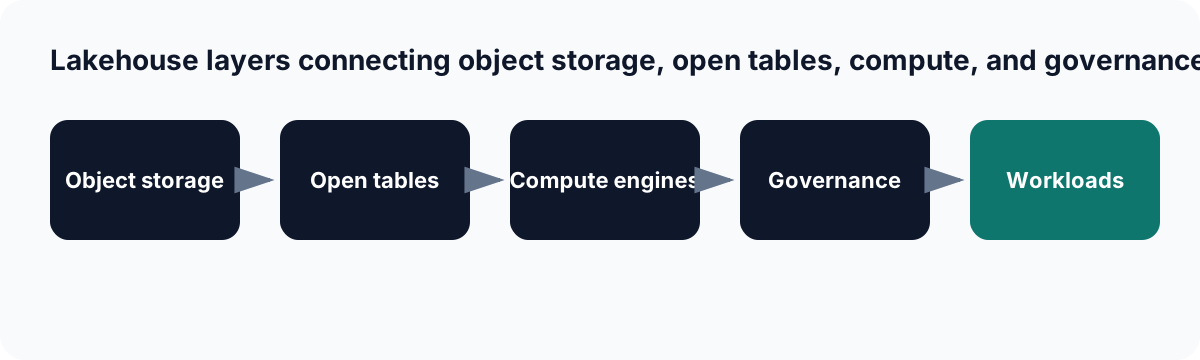
A lakehouse separates durable storage from table metadata and compute while applying a shared governance layer.
Databricks offers a free accreditation called the Lakehouse Platform Fundamentals. It tests whether you understand the platform's architecture, components, and concepts well enough to work with it without being lost. It is not a deep certification. It is the first checkpoint.
This article covers the same ground that accreditation covers, plus some practical context that the official materials tend to skip. By the end, you should be able to describe how data moves through a Databricks Lakehouse, what every major component does, and how they connect to each other.
The workspace: what you actually see
When you log into Databricks, you land in a workspace. A workspace is your working environment on the platform. It contains your notebooks, jobs, pipelines, SQL queries, dashboards, and compute resources.
One Databricks account can have multiple workspaces. A company might have separate workspaces for development, staging, and production. Or separate workspaces for different business units. Workspaces sit inside regions: a workspace in US East does not share compute with a workspace in West Europe.
DATABRICKS ACCOUNT
├── Workspace: prod-us-east
│   ├── Notebooks
│   ├── Jobs (Lakeflow Jobs)
│   ├── Pipelines (Lakeflow Pipelines)
│   ├── SQL Editor
│   ├── Compute (clusters, SQL warehouses)
│   └── Dashboards
│
├── Workspace: dev-us-east
│   └── (same structure, isolated environment)
│
└── Unity Catalog metastore (shared across workspaces in the same region)
    └── governs all data assets in all workspaces
What actually changed in 2026 is that Databricks introduced a separate consumer interface called Databricks One. The classic workspace is for engineers, data scientists, and SQL developers who need full platform access. Databricks One is a simplified read-only interface for business users who only need dashboards and conversational data access through Genie. Both interfaces sit on the same workspace and share the same governance through Unity Catalog.
Most beginners start in the classic workspace. That is what the rest of this article assumes.
Unity Catalog: how governance actually works
Unity Catalog is the governance layer that sits across all workspaces in your Databricks account. It controls who can access which data, tracks where data came from and where it went, and provides a searchable catalog of everything in your Lakehouse.
The hierarchy has four levels:
UNITY CATALOG HIERARCHY
-----------------------
Metastore                 (account-level, one per region)
└── Catalog               (environment or domain separation)
    └── Schema            (formerly called a database)
        └── Table         (Delta tables, views, external tables)
            Volumes        (unstructured files: CSVs, images, etc.)
            Models         (ML models registered in the catalog)
            Functions      (user-defined functions)
A full table reference looks like this:
SELECT * FROM prod.sales.orders
-- catalog: prod
-- schema:  sales
-- table:   orders
This three-level namespace is one of the most important things to internalize early. Before Unity Catalog, Databricks tables were referenced with just schema.table. Now every object lives inside a catalog, which makes it possible to have dev.sales.orders and prod.sales.orders as completely separate tables with separate access controls.
The metastore is the top-level container for all metadata. There is one metastore per region per account. It is created automatically when you set up a new workspace in a region. All workspaces in the same region share the same metastore, which means they can see each other's catalogs and tables (subject to permissions).
Catalogs separate environments or data domains. Common patterns: a prod catalog and a dev catalog to separate production from development data. Or domain-based catalogs like marketing, finance, engineering.
Schemas are what older Databricks documentation called databases. They live inside a catalog and group related tables together.
Tables are Delta tables by default. Every time you create a table in Databricks without specifying otherwise, it is a managed Delta table, stored in Unity Catalog-managed cloud storage and fully governed.
Permissions in Unity Catalog follow the principle of least privilege. A user has access only to what they have explicitly been granted. Granting access to a catalog gives access to everything inside it by default, but you can restrict to specific schemas or tables. Row-level security and column-level masking are also supported for sensitive data.
Compute: clusters vs SQL warehouses vs serverless
One of the things that confuses beginners most is that Databricks has multiple compute options that look different in the UI. Here is what each one is for:
All-purpose clusters run general workloads interactively. You attach a cluster to a notebook and run code. Python, SQL, Scala, R. You can keep a cluster running while you work and shut it down when you are done. Classic all-purpose clusters give you full configuration control: instance type, node count, Databricks Runtime version, library installations.
Job clusters are created automatically when a Lakeflow Job runs and terminated when the job finishes. You do not manage them manually. They exist for the duration of a scheduled task and nothing else.
SQL warehouses are compute resources dedicated to SQL analytics. When you use the Databricks SQL editor, run a dashboard query, or connect a BI tool like Tableau or Power BI, the queries run on a SQL warehouse. SQL warehouses are optimized for SQL workloads and use Photon (Databricks' native C++ query engine) by default.
Serverless compute is the 2026 default for most workloads. You write code in a notebook or pipeline and run it. Databricks spins up compute instantly, runs your job, and you pay only for what you use. No cluster configuration, no instance selection, no wait time for cluster startup.
WHEN TO USE WHICH COMPUTE
--------------------------
Notebook with Python / PySpark   ──► All-purpose cluster (or serverless notebook)
Scheduled ETL pipeline           ──► Job cluster (or serverless pipeline)
SQL query in SQL editor          ──► SQL warehouse (serverless SQL warehouse)
BI tool connection               ──► SQL warehouse
ML model training                ──► All-purpose cluster with GPU
The practical advice for beginners: start with serverless. You avoid the overhead of cluster configuration while you are learning the platform. Once you need custom libraries, specific Spark configurations, or GPU instances, move to classic clusters.
How data flows through a Lakehouse
This is the full picture of how data moves through a production Databricks Lakehouse. It is worth understanding this end to end before you dig into any individual component.
EXTERNAL SOURCES                 DATABRICKS LAKEHOUSE                  CONSUMERS
----------------                 --------------------                  ---------
Databases (Postgres, MySQL)  ─►
SaaS apps (Salesforce, etc.) ─►   BRONZE LAYER
Cloud files (S3, ADLS)       ─►   Raw ingested data      ─►  SILVER LAYER  ─►  GOLD LAYER  ─►  BI Tools
Streaming events (Kafka)     ─►   (Delta tables)              Cleaned data       Aggregated      SQL Editor
APIs                         ─►                               Joined records     Metrics         ML Models
                                                              Validated          Features        Dashboards
                                  Governed by Unity Catalog across all layers
                                  All compute powered by Apache Spark / Photon
Every layer is Delta tables. Every table is governed by Unity Catalog. Compute runs on Spark. That is the whole architecture in one diagram.
The Medallion architecture in practice
The Medallion architecture is the most common data organization pattern in Databricks. It has three layers, named after metals to suggest progressive refinement: Bronze, Silver, Gold.
Bronze is where raw data lands. You ingest data from your source systems and write it to Bronze exactly as it arrived. No transformations, no cleaning, no filtering. If the source sends you a malformed JSON field, that malformed field is in Bronze. The goal is a complete, immutable record of everything that came in.
Silver is where you clean and structure the data. You read from Bronze, apply transformations, filter bad records, join related tables, enforce data types, and write the results to Silver. Silver tables are what most analysts and data scientists work from. The data is validated and consistent, but not yet aggregated for specific business questions.
Gold is business-ready data. You read from Silver and build aggregations, metrics, and feature tables that answer specific questions. Sales totals by region. Customer lifetime value. Daily active users. Gold tables feed dashboards, BI reports, and ML model features.
Here is what this looks like in SQL inside Databricks:
-- Bronze: raw ingestion, land exactly as received
CREATE TABLE bronze.sales.raw_orders
USING DELTA
AS SELECT * FROM read_files(
  'abfss://raw@storageaccount.dfs.core.windows.net/orders/',
  format => 'json'
);

-- Silver: clean, validate, type-cast
CREATE TABLE silver.sales.orders
USING DELTA
AS SELECT
  order_id::STRING,
  customer_id::STRING,
  amount::DOUBLE,
  to_date(order_date, 'yyyy-MM-dd') AS order_date,
  status::STRING
FROM bronze.sales.raw_orders
WHERE order_id IS NOT NULL
  AND amount > 0;

-- Gold: aggregate for reporting
CREATE TABLE gold.sales.daily_revenue
USING DELTA
AS SELECT
  order_date,
  SUM(amount)   AS total_revenue,
  COUNT(*)      AS order_count
FROM silver.sales.orders
WHERE status = 'completed'
GROUP BY order_date;
Notice the three-level catalog naming: bronze.sales.raw_orders, silver.sales.orders, gold.sales.daily_revenue. In a real Databricks setup, Bronze, Silver, and Gold are typically separate catalogs in Unity Catalog, not just folder conventions. This makes access control clean: analysts might have read access to Silver and Gold but not Bronze. Engineers have write access to all three.
Lakeflow: how pipelines actually work
In Article 1 I mentioned that Databricks' pipeline system is called Lakeflow. Here is what that actually means in practice.
Lakeflow has three components that cover the full pipeline lifecycle:
Lakeflow Connect handles ingestion from external sources. It provides built-in connectors for enterprise databases, SaaS applications, and event streams. The ingested data lands in Delta tables governed by Unity Catalog. For files arriving in cloud storage (S3, ADLS), Auto Loader handles incremental ingestion automatically, tracking which files have already been processed so you do not ingest duplicates.
Lakeflow Spark Declarative Pipelines is the transformation layer. This is what was previously called Delta Live Tables. You define your pipeline in Python or SQL using a declarative style: you describe what the output table should look like, and Databricks figures out how to compute it, handle failures, retry, and track data quality. The platform manages the execution order and dependencies between tables automatically.
import dlt
from pyspark.sql.functions import col, to_date

# Lakeflow Spark Declarative Pipeline example
@dlt.table(
  name="silver_orders",
  comment="Cleaned and validated orders from Bronze"
)
@dlt.expect("valid_amount", "amount > 0")
@dlt.expect_or_drop("order_id_not_null", "order_id IS NOT NULL")
def silver_orders():
  return (
    dlt.read("bronze_raw_orders")
       .select(
         col("order_id").cast("string"),
         col("customer_id").cast("string"),
         col("amount").cast("double"),
         to_date(col("order_date"), "yyyy-MM-dd").alias("order_date"),
         col("status").cast("string")
       )
  )
The @dlt.expect decorators define data quality rules. Records that fail the valid_amount check are flagged. Records that fail order_id_not_null are dropped. You get a quality dashboard automatically showing how many records passed or failed each rule.
Lakeflow Jobs is the orchestration layer. It schedules notebooks, pipelines, and scripts to run at specific times or triggered by events. A typical job might run the Bronze ingestion pipeline first, then the Silver transformation, then the Gold aggregation, in sequence. You can set up retry logic, email alerts on failure, and dependency graphs between tasks all in the Lakeflow Jobs UI.
Photon: the query engine underneath
When you run a SQL query on a Databricks SQL warehouse, or enable Photon on a cluster, the query does not run through the standard Spark JVM engine. It runs through Photon, Databricks' native query execution engine written in C++.
Photon runs the same Spark SQL and DataFrame operations you already write, just faster. You do not change your code. Photon handles vectorized execution, which means it processes entire columns of data at once rather than row by row. For SQL-heavy workloads and large scans, Photon typically delivers significantly faster query times compared to standard Spark.
As a beginner, you do not need to understand Photon's internals. What matters is knowing it exists and that it is why Databricks SQL warehouses are fast enough to serve BI tools and dashboards at interactive speeds, even over large Delta tables.
Mosaic AI: where machine learning fits
Databricks calls its ML and AI layer Mosaic AI. For beginners, the important parts are:
MLflow is an open source experiment tracking tool that is built into Databricks. When you train a model, MLflow logs the parameters you used, the metrics it achieved, and the model artifact itself. You can compare runs, reproduce experiments, and register the final model in Unity Catalog.
Model serving deploys registered models as REST API endpoints. You register a model in Unity Catalog, create a serving endpoint, and that model is available for real-time inference. Other applications call the endpoint and get predictions back.
Feature engineering (formerly Feature Store) lets teams store and share ML features as Delta tables in Unity Catalog. Instead of every data scientist computing the same features from scratch, features are computed once, stored, governed, and reused across projects.
Vector Search stores and retrieves high-dimensional embeddings for semantic search and retrieval-augmented generation (RAG) applications. If you are building a chatbot that retrieves relevant documents before answering, Vector Search is how Databricks does the retrieval layer.
For a beginner, the key thing to understand is that ML in Databricks is not a separate product. Models, features, and experiments are all registered in Unity Catalog alongside your data tables. The same governance model covers everything.
The full platform in one diagram
Putting everything from this article and the previous two together:
DATABRICKS DATA INTELLIGENCE PLATFORM
         ======================================

INGESTION          STORAGE              PROCESSING          CONSUMPTION
---------          -------              ----------          -----------
Lakeflow           Delta Lake           Apache Spark        SQL Editor
Connect    ──────► (Bronze /   ──────►  Photon      ──────► Dashboards
Auto Loader        Silver /             Lakeflow            BI Tools
Streaming          Gold)                Jobs                ML Serving
                                        Declarative         Genie (NL)
                                        Pipelines           Databricks One

                        UNITY CATALOG (governance layer)
                        ─────────────────────────────────
                        Metastore ► Catalog ► Schema ► Table
                        Permissions, Lineage, Discovery, Quality

                        COMPUTE
                        ───────
                        Serverless (default) | Classic Clusters | SQL Warehouses
This is the full picture. Everything you have read across all three articles maps to a box in this diagram.
How to start learning Databricks right now
You do not need a cloud subscription to start. Databricks has a Community Edition that gives you a free workspace with limited compute. It is enough to create notebooks, write SQL, create Delta tables, and understand how the interface works. You will not have Unity Catalog or Lakeflow in Community Edition, but you will get comfortable with the basics.
For structured learning, the Databricks Lakehouse Platform Fundamentals accreditation is free and can be completed in a few hours. It covers the architecture, Delta Lake, Unity Catalog, and the main workload types. Finishing it gives you a credential you can add to LinkedIn, and it maps closely to what is covered in this article.
After that, the Databricks Fundamentals course on Databricks Academy goes deeper into Spark, the Medallion architecture, and building pipelines. It is a good next step before attempting the Data Engineer Associate certification.
The path most beginners follow:
Community Edition        ──► Understand the interface, write first Delta tables
Lakehouse Fundamentals   ──► Understand the architecture and platform components
Databricks Fundamentals  ──► Spark, Medallion, pipelines, Unity Catalog in depth
Data Engineer Associate  ──► First real certification, validates practical knowledge
Conclusion
This is what the Databricks Lakehouse platform looks like in 2026: a workspace where you write code, Unity Catalog that governs everything with a three-level namespace, Delta Lake as the storage format underneath every table, the Medallion architecture as the standard way to organize data through Bronze, Silver, and Gold layers, Lakeflow for ingestion and pipeline orchestration, and Mosaic AI for ML and model deployment.
None of these components is optional. They all connect. Unity Catalog governs the tables that Lakeflow writes. Lakeflow runs on compute that processes Delta tables. MLflow registers models in the same catalog that holds your data. Understanding how they fit together is what this series has been building toward.
If you have read all three articles, you have the foundation you need to start working in Databricks with context, not just clicking around hoping things make sense.
This is Article 3 of the beginner Databricks series. Article 1 covers What Is Databricks. Article 2 covers Data Lake vs Data Warehouse vs Databricks Lakehouse. Future articles in the series go deeper on Delta Lake, Unity Catalog, Lakeflow Pipelines, and the Data Engineer Associate certification roadmap.
If your company builds data or AI products and needs technical content that actually explains the platform rather than restating the marketing page, that is what I do. See how to work with me on articles, tutorials, and content series for data engineering tools, AI platforms, and developer-facing products. The kind of content that helps engineers understand something rather than just know it exists. If that is useful to your team, reach out at imkrunalkanojiya@outlook.com.
Sources
Frequently Asked Questions
What is the Unity Catalog hierarchy in Databricks?
Unity Catalog organizes everything in a three-level namespace: metastore at the top, then catalogs, then schemas (databases), then tables and other objects inside each schema. A full table reference looks like catalog.schema.table_name. The metastore is account-level and shared across workspaces. Catalogs are used to separate environments or domains, like prod.sales.orders versus dev.sales.orders.
What is the difference between a cluster and a SQL warehouse in Databricks?
A cluster runs general-purpose workloads: Python notebooks, Spark jobs, ML training, pipeline code. A SQL warehouse is a compute resource optimized specifically for SQL analytics and BI tools. If you are running a notebook with Python or writing a pipeline, you use a cluster. If you are running SQL queries from the Databricks SQL editor or connecting a BI tool like Tableau, you use a SQL warehouse.
What is the Medallion architecture in Databricks?
The Medallion architecture is a data organization pattern with three layers: Bronze stores raw ingested data exactly as it arrived. Silver cleans, filters, and joins that data into validated, consistent records. Gold contains business-ready aggregations used for reporting, dashboards, and ML features. Data flows one direction through the layers. Most production Databricks deployments follow this pattern.
What is Lakeflow in Databricks?
Lakeflow is the name Databricks uses for its data pipeline and orchestration system. It covers three things: Lakeflow Connect for ingesting data from external sources, Lakeflow Spark Declarative Pipelines (formerly Delta Live Tables) for building reliable ETL pipelines with declarative syntax, and Lakeflow Jobs for scheduling and orchestrating all workloads on the platform.
What is serverless compute in Databricks?
Serverless compute means Databricks manages the infrastructure for you. You do not provision clusters, choose instance types, or configure auto-scaling. You just run your code and pay for what you use. In 2026, serverless is the default for most Databricks workloads including notebooks, SQL warehouses, and Lakeflow pipelines. Classic clusters still exist for workloads that need custom configuration.
How do I start learning Databricks for free?
Databricks has a Community Edition that gives you a free workspace with limited compute. It is enough to work through notebooks, create Delta tables, and understand the interface. The Databricks Lakehouse Fundamentals accreditation is also free and can be completed online. It covers the platform architecture, Delta Lake, Unity Catalog, and core workload types, and finishing it gives you a credential to show on LinkedIn.
What is Photon in Databricks?
Photon is Databricks' native query execution engine, written in C++ rather than Java. It runs SQL and DataFrame operations significantly faster than the standard Spark JVM engine for many workloads. Photon is enabled by default on SQL warehouses and can be enabled on clusters. You do not write code differently to use it. It just runs your existing SQL and DataFrame code faster.
Follow on Google
Add as a preferred source in Search & Discover
Add as preferred source
Krunal Kanojiya
Technical Content Writer
Krunal is a technical content writer at Lucent Innovation and a former full-stack developer with professional technology experience since 2021. He publishes source-backed, practical guides on AI engineering, RAG, vector search, data engineering, algorithms, and software development.