HNSW Algorithm Explained With Diagrams
A research-backed, diagram-rich explanation of the HNSW (Hierarchical Navigable Small World) algorithm. Learn how the layered graph is built, how query traversal works layer by layer, how the three key parameters M, ef_construction, and ef_search control the recall-latency tradeoff, and how to tune HNSW for production vector search workloads.
In 2016, Yu Malkov and Dmitry Yashunin published a paper titled "Efficient and Robust Approximate Nearest Neighbor Search Using Hierarchical Navigable Small World Graphs." The paper introduced HNSW and proposed solving the approximate nearest neighbor problem by giving vectors a social life.
The analogy holds surprisingly well. In a social network, you can reach almost anyone through a small chain of acquaintances. A few well-connected people serve as hubs that bridge different communities. You find a specialist in a distant field not by searching the entire population, but by hopping through a chain of referrals, each one bringing you closer. HNSW builds the same navigable structure in a high-dimensional vector space, with vectors as nodes, proximity-based edges as connections, and a hierarchical layer structure that makes the traversal logarithmically fast.
HNSW is now the default ANN algorithm in Qdrant, Weaviate, pgvector, and Milvus. It ships as the primary ANN option in FAISS and is the algorithm behind Lucene's kNN implementation used in Elasticsearch and OpenSearch.
I have tuned HNSW in production more than any other index, and almost every real gain came down to just three parameters. This article shows how the graph is built, how a query walks through it, and how to set those three parameters for your own workload.
This article is part of the How Vector Databases Work Internally series. It goes deep on the construction and traversal algorithms with diagrams, parameter tuning, and production implementation. The prerequisite article is exact vs approximate nearest neighbor search, which establishes why ANN is necessary and how recall is measured. The IVF index article covers the alternative cluster-based algorithm and compares it directly against HNSW at the end.
The Two Ideas That HNSW Combines
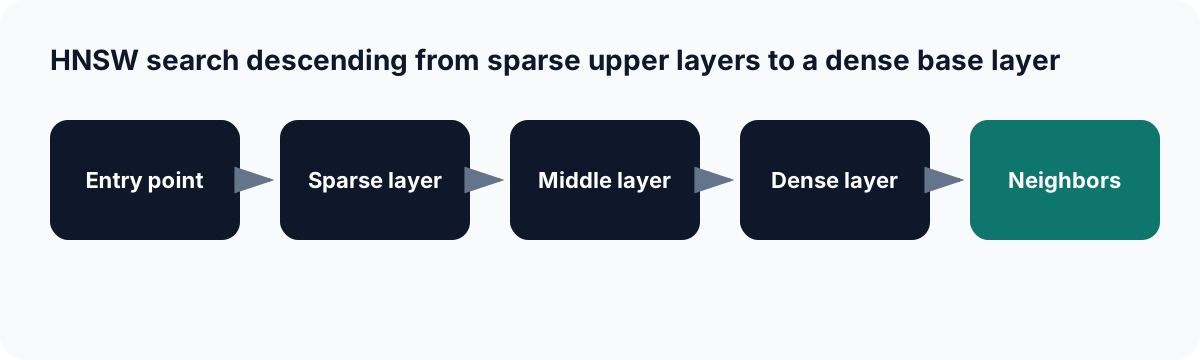
HNSW starts with long-range navigation in sparse layers, then refines candidates in denser layers.
HNSW is built from two conceptually independent ideas: the skip list and the navigable small world graph. Understanding each separately makes the combined structure intuitive.
Skip Lists: Hierarchy for Fast Sorted Search
A skip list is a layered linked list. The bottom layer contains every element. Each higher layer contains a random subset of the layer below, acting as an express lane that jumps over many elements at once.
Skip list with 8 elements (ascending order):

Layer 2:  [1] ————————————————————————————————— [7]
Layer 1:  [1] ——————— [3] ——————— [5] ——————— [7]
Layer 0:  [1] - [2] - [3] - [4] - [5] - [6] - [7] - [8]
To find element 5, you start at the leftmost node in the highest layer and move right as far as possible without overshooting, then descend. You might traverse: Layer 2 right to [7], too far so descend to Layer 1. Layer 1 right to [3], still less than 5, continue right to [5]. Found. The search took about log(n) steps regardless of list length.
HNSW borrows this exact structure. Instead of sorted elements in a list, it uses proximity-connected vectors in a graph. Instead of "move right," the traversal uses "move to the nearest neighbor." Instead of "overshoot," the termination condition is "no neighbor is closer than the current node."
Navigable Small World Graphs: Proximity Graphs With Long-Range Links
A navigable small world (NSW) graph connects each vector to its nearest neighbors. When a vector is inserted, it connects to the M closest existing vectors in the graph. Early-inserted vectors accumulate many long-range connections because they have few neighbors at insertion time and connect across the entire space. These early nodes become hubs: well-connected navigational shortcuts.
According to Keyur Ramoliya's HNSW analysis, NSW graphs combined local connectivity patterns of traditional proximity graphs with long-range connections that enable rapid traversal across the entire dataset. The construction process creates hub nodes with many connections that serve as bridges between different regions of the vector space.
NSW alone produces polylogarithmic search complexity because the average node degree grows as the network gets larger. HNSW fixes this by separating long-range connections into upper layers where few nodes exist. The hub effect is controlled and made explicit by the layer structure.
The HNSW Graph Structure
An HNSW index is a set of stacked graphs, one per layer. Each layer is an NSW graph, but with different node populations and connection densities.
HNSW structure for 10 vectors (A through J):

Layer 2 (2 nodes, long-range connections):
  [A] ———————————————————————————— [H]

Layer 1 (5 nodes, medium-range connections):
  [A] ——————— [C] ——————— [F] ——————— [H]
               |                       |
              [B]                     [I]

Layer 0 (10 nodes, all vectors, short-range connections):
  [A]-[B]-[C]-[D]-[E]-[F]-[G]-[H]-[I]-[J]
   |   |   |   |       |       |   |
  [B] [A] [B] [C]     [E]     [G] [H]
              [E]     [G]
Key structural properties:
Every vector appears in layer 0. The bottom layer contains all nodes and all their short-range nearest-neighbor connections. This is where precise local search happens.
Higher layers contain a geometric fraction of the nodes below. The probability that a node appears in layer l follows an exponential decay: most nodes exist only in layer 0, some exist in layers 0 and 1, fewer in layers 0 through 2, and so on. This produces a natural hierarchy where upper layers are sparse and contain only the most connected nodes.
Connections at each layer connect each node to its M nearest neighbors within that layer. Upper-layer connections span longer distances (in vector space terms) because fewer nodes are present and the nearest neighbors in a sparse graph are farther away. This is the long-range routing effect.
According to Zilliz's HNSW guide, the uppermost layer of an HNSW graph has few nodes and the longest links, while the bottommost layer has all nodes and the shortest links.
Index Construction: Inserting a New Vector
When a new vector is inserted into an existing HNSW index, a precise sequence of steps occurs.
Step 1: Assign a Maximum Layer
The maximum layer is drawn from a randomized exponential distribution. This is what creates the skip-list-style hierarchy automatically without any global planning.
import math
import random

def get_max_layer(M: int) -> int:
    """
    Draw a random maximum layer for a new node.
    The normalization factor 1/ln(M) ensures the expected number
    of nodes per layer decreases by a factor of M per layer,
    creating the desired sparse-to-dense hierarchy.
    """
    normalization_factor = 1.0 / math.log(M)
    return int(-math.log(random.uniform(0, 1)) * normalization_factor)

# Distribution across 1000 insertions with M=16
import collections
M = 16
layer_counts = collections.Counter(get_max_layer(M) for _ in range(1000))
for layer in sorted(layer_counts):
    bar = "#" * (layer_counts[layer] // 10)
    print(f"Layer {layer}: {layer_counts[layer]:4d} nodes  {bar}")

# Approximate output:
# Layer 0:  937 nodes  #########################...
# Layer 1:   55 nodes  #####
# Layer 2:    6 nodes
# Layer 3:    2 nodes
The exponential decay means roughly 1/M fraction of layer-0 nodes appear in layer 1, 1/M of those appear in layer 2, and so on. For M=16, you get about 937 nodes in layer 0, 59 in layer 1, 4 in layer 2, and perhaps 1 in layer 3 out of every 1000 insertions.
Step 2: Descend From the Top, Seeking the Entry Point for Layer Max
Before connecting the new node, the algorithm must find where in the existing graph to start the fine-grained search. It enters at the current global entry point (the node in the highest existing layer) and descends layer by layer until it reaches the new node's max layer.
New node X assigned to max_layer = 1.
Current entry point E is in layer 3.

Descent to layer 1:
  Layer 3: enter at E, greedily move toward X with ef=1 (single best node)
           arrive at closest node to X reachable in layer 3 → call it P3
  Layer 2: enter at P3, greedily move → arrive at P2
  Layer 1: enter at P2. Stop. We are now at the layer where X will be inserted.
This descent uses ef=1 (only tracking the single closest node at each step) because the goal here is just to find a good starting position, not to retrieve high-quality neighbors.
Step 3: Insert the Node at Each Layer From Max Down to Layer 0
At each layer from max_layer down to 0, the algorithm runs a full nearest-neighbor search with the candidate set controlled by ef_construction, finds the M closest nodes, and connects the new node to them.
import heapq
import numpy as np

def insert_node_at_layer(
    graph: dict,           # existing graph structure
    new_node_id: int,
    new_vector: np.ndarray,
    vectors: np.ndarray,   # all stored vectors
    entry_point: int,      # starting node for search at this layer
    layer: int,
    M: int,
    ef_construction: int,
) -> list[int]:
    """
    Find the best M neighbors for the new node at this layer
    and add bidirectional edges.
    Returns: list of neighbor IDs selected for the new node.
    """
    # Beam search: maintain a candidate set of size ef_construction
    # Priority queue: (negative similarity, node_id) for max-heap via negation
    candidates  = [(-similarity(new_vector, vectors[entry_point]), entry_point)]
    visited     = {entry_point}
    result_heap = list(candidates)   # best nodes found so far

    while candidates:
        dist, current = heapq.heappop(candidates)
        dist = -dist

        # If current node is farther than the worst node in results,
        # we cannot improve the result set - stop exploring
        if result_heap and -result_heap[0][0] < dist:
            break

        for neighbor_id in graph[layer].get(current, []):
            if neighbor_id not in visited:
                visited.add(neighbor_id)
                sim = similarity(new_vector, vectors[neighbor_id])
                heapq.heappush(candidates, (-sim, neighbor_id))
                heapq.heappush(result_heap, (-sim, neighbor_id))

                # Keep result_heap bounded to ef_construction
                if len(result_heap) > ef_construction:
                    heapq.heappop(result_heap)

    # Select top M from result_heap as neighbors
    selected = sorted(result_heap, reverse=True)[:M]
    neighbor_ids = [nid for _, nid in selected]

    # Add bidirectional edges
    graph[layer][new_node_id] = neighbor_ids
    for nid in neighbor_ids:
        if nid in graph[layer]:
            graph[layer][nid].append(new_node_id)
            # If existing node exceeds M_max connections, prune to M
            if len(graph[layer][nid]) > M:
                graph[layer][nid] = prune_to_m(
                    graph[layer][nid], vectors, nid, M
                )

    return neighbor_ids

def similarity(a: np.ndarray, b: np.ndarray) -> float:
    return float(np.dot(a, b))   # assumes L2-normalized vectors

def prune_to_m(neighbors: list, vectors: np.ndarray, node_id: int, M: int) -> list:
    """Keep the M closest neighbors by similarity to the node."""
    sims = [(similarity(vectors[node_id], vectors[n]), n) for n in neighbors]
    sims.sort(reverse=True)
    return [n for _, n in sims[:M]]
The construction diagram for a single insertion looks like this:
Inserting new node X (assigned to max_layer=1):

Layer 1 (M=2 connections):
  Before: [A] - [C] - [F]
  Search from entry P2 with ef_construction=10:
    Finds that F and C are X's two closest existing neighbors in layer 1
  After:  [A] - [C] - [F] - [X]
                       |
                      [C] (X also connects back to C)

Layer 0 (M=2 connections):
  Before: [A]-[B]-[C]-[D]-[E]-[F]-[G]
  Enter at F (the best result from layer 1 descent), ef_construction=10:
    Finds that E and F are X's two closest in layer 0
  After:  [A]-[B]-[C]-[D]-[E]-[F]-[G]
                          |   |
                         [X]—[X]   (X connects to both E and F)
The ef_construction parameter controls the beam width during this neighbor search. A larger beam explores more of the graph during insertion, finds better neighbors, and produces a higher-quality graph. The cost is more distance computations per insertion and therefore longer index build time.
According to the hnswlib algorithm parameters documentation, ef_construction controls the index time and index accuracy. A larger ef_construction leads to longer construction but a better-quality index. One way to check if ef_construction was set adequately is to measure Recall@M for M nearest neighbor search when ef_search equals ef_construction. If the recall is lower than 0.9, there is room for improvement.
Query Traversal: Finding Nearest Neighbors at Search Time
The search algorithm mirrors the construction process but in reverse: descend from the top layer to the bottom, using each layer's result as the entry point for the next.
Query: find top-10 vectors nearest to query vector Q.

Layer 2 (if it exists): Enter at global entry point E.
  Explore neighbors with ef=1 (greedy, single candidate tracked).
  Arrive at node P2, the closest node to Q reachable in layer 2.
  Descend to layer 1 with P2 as starting point.

Layer 1: Enter at P2.
  Explore neighbors with ef=1.
  Arrive at P1, the closest node to Q reachable in layer 1.
  Descend to layer 0 with P1 as starting point.

Layer 0 (all nodes): Enter at P1.
  Run beam search with ef_search=64 (large candidate set, thorough search).
  Track the 64 most promising candidates seen during traversal.
  Continue until no unexplored candidate can improve the result set.
  Return top-10 from the final candidate set.
The critical asymmetry: upper layers use ef=1 (single greedy step per layer) to quickly navigate to the right neighborhood. Layer 0 uses ef_search (the tunable parameter) to thoroughly explore that neighborhood and find the true local nearest neighbors.
import heapq
import numpy as np

def hnsw_search(
    graph: dict,           # layer → {node_id: [neighbor_ids]}
    vectors: np.ndarray,
    query: np.ndarray,
    entry_point: int,
    max_layer: int,
    k: int = 10,
    ef_search: int = 64,
) -> list[tuple[float, int]]:
    """
    HNSW query traversal.
    Returns list of (similarity, node_id) for top-k results, sorted descending.
    """
    current_ep = entry_point

    # Phase 1: greedy descent through upper layers (ef=1)
    for layer in range(max_layer, 0, -1):
        current_ep = greedy_search_layer(
            graph, vectors, query, current_ep, layer, ef=1
        )

    # Phase 2: beam search at layer 0 (ef=ef_search)
    candidates = beam_search_layer(
        graph, vectors, query, current_ep, layer=0, ef=ef_search
    )

    # Return top-k from the beam search result
    return sorted(candidates, reverse=True)[:k]


def greedy_search_layer(
    graph: dict,
    vectors: np.ndarray,
    query: np.ndarray,
    entry_point: int,
    layer: int,
    ef: int,
) -> int:
    """Greedy single-best traversal. Returns the ID of the closest node found."""
    best    = entry_point
    best_sim = similarity(query, vectors[entry_point])
    changed = True

    while changed:
        changed = False
        for neighbor_id in graph[layer].get(best, []):
            sim = similarity(query, vectors[neighbor_id])
            if sim > best_sim:
                best     = neighbor_id
                best_sim = sim
                changed  = True

    return best


def beam_search_layer(
    graph: dict,
    vectors: np.ndarray,
    query: np.ndarray,
    entry_point: int,
    layer: int,
    ef: int,
) -> list[tuple[float, int]]:
    """
    Beam search at layer 0. Maintains ef candidates simultaneously.
    Returns list of (similarity, node_id) for all nodes explored.
    """
    entry_sim  = similarity(query, vectors[entry_point])
    candidates = [(-entry_sim, entry_point)]   # min-heap by negative sim
    results    = [( entry_sim, entry_point)]   # max-heap by sim
    visited    = {entry_point}

    while candidates:
        neg_sim, current = heapq.heappop(candidates)
        curr_sim = -neg_sim

        # If worst result is better than best unexplored candidate: stop
        if results and results[0][0] > curr_sim:
            break

        for neighbor_id in graph[layer].get(current, []):
            if neighbor_id in visited:
                continue
            visited.add(neighbor_id)
            sim = similarity(query, vectors[neighbor_id])
            heapq.heappush(candidates, (-sim, neighbor_id))
            heapq.heappush(results,    ( sim, neighbor_id))

            # Bound results to ef
            if len(results) > ef:
                heapq.heappop(results)

    return results
The traversal diagram for a query makes the efficiency visible:
Query Q, HNSW with 3 layers and 1M vectors:

Layer 2 (100 nodes):
  Enter at entry point E.
  Step 1: E's neighbors [A, F]. F is closer to Q. Move to F.
  Step 2: F's neighbors [H, K]. Neither closer than F. Local minimum.
  Descend to Layer 1 with F as entry point.

Layer 1 (10,000 nodes):
  Enter at F.
  Step 1: F's neighbors [F2, F3, F4]. F3 is closest. Move.
  Step 2: F3's neighbors [F3a, F3b]. F3a is closest. Move.
  Step 3: F3a's neighbors. No improvement. Local minimum.
  Descend to Layer 0 with F3a as entry point.

Layer 0 (1,000,000 nodes):
  Enter at F3a with ef_search=64.
  Maintain 64-candidate beam. Explore all reachable neighbors.
  Terminate when no unexplored candidate can improve the top-64.
  Total nodes explored at layer 0: ~200 to 500 (not 1,000,000).
  Return top-10 from the 64-candidate result set.
This is what makes HNSW O(log n): upper layers navigate across the full collection in a handful of hops, delivering a starting point close to the query for the final exhaustive local search. Without the hierarchy, the local search at layer 0 would need a better starting point, which would require exploring more of the graph, destroying the efficiency.
According to cfu288's visual HNSW guide, when searching for k nearest neighbors in an existing HNSW graph, the algorithm starts at the entry point (the node with the highest layer) and performs a greedy graph traversal downward through the layers. At upper layers, the algorithm uses ef=1, meaning it maintains only the single closest node found during traversal. Once a local minimum is found at a layer, the search descends to the next layer down and continues.
The Three Parameters and Their Effects
Every production HNSW configuration is controlled by three parameters. Getting them right determines both the recall you achieve and the latency and memory you pay for it.
M: Graph Connectivity
M is the maximum number of bidirectional connections each node can have per graph layer. Layer 0 uses 2*M connections; all other layers use M.
Effect of M on graph structure (same 5-node example):

M=2:
  Layer 0: [A]-[B]  [A]-[C]
           [C]-[D]  [D]-[E]
  Few connections, fast traversal, lower recall
  Nodes can become isolated from distant regions

M=4:
  Layer 0: [A]-[B]  [A]-[C]  [A]-[D]  [A]-[E]
           [B]-[C]  [B]-[D]
           [C]-[D]  [C]-[E]
  Richer connectivity, higher recall, more memory
Higher M creates a denser graph where more paths exist between any two nodes. The search finds nearby nodes more reliably, improving recall. The cost: the graph takes more memory (M edges per node, each edge is 8 bytes, so M=16 adds roughly 128 bytes per vector) and takes longer to build (each insertion must find and connect to M neighbors).
According to the hnswlib documentation, the parameter determines the algorithm's memory consumption, which is roughly M * 8 to 10 bytes per stored element. For high-dimensional datasets like word embeddings or face descriptors, higher M values in the range of 48 to 64 are required for optimal performance at high recall.
import faiss
import numpy as np

d = 128
n = 100_000
k = 10

corpus = np.random.randn(n, d).astype(np.float32)
faiss.normalize_L2(corpus)
query = np.random.randn(1, d).astype(np.float32)
faiss.normalize_L2(query)

# Ground truth
flat = faiss.IndexFlatIP(d)
flat.add(corpus)
_, gt = flat.search(query, k)

print(f"{'M':>4} | {'Recall@10':>10} | {'Index Size MB':>13} | {'Build Time':>10}")
print("-" * 48)
for M in [4, 8, 16, 32, 48]:
    idx = faiss.IndexHNSWFlat(d, M)
    idx.hnsw.efConstruction = 200
    idx.hnsw.efSearch = 64

    import time
    t0 = time.perf_counter()
    idx.add(corpus)
    build_s = time.perf_counter() - t0

    _, ann = idx.search(query, k)
    recall = len(set(gt[0]) & set(ann[0])) / k

    # HNSW memory is approximately: raw vectors + M * 8 bytes per vector
    raw_mb    = n * d * 4 / 1e6
    graph_mb  = n * M * 8 / 1e6
    total_mb  = raw_mb + graph_mb

    print(f"{M:>4} | {recall:>10.2f} | {total_mb:>11.1f}MB | {build_s:>8.1f}s")

# Approximate output:
#    M | Recall@10 | Index Size MB | Build Time
# -------------------------------------------------
#    4 |      0.73 |          55.5MB |      1.2s
#    8 |      0.87 |          59.7MB |      2.1s
#   16 |      0.95 |          68.2MB |      3.9s
#   32 |      0.98 |          85.0MB |      7.4s
#   48 |      0.99 |         101.8MB |     11.8s
The recall saturates as M increases. Going from M=16 to M=32 buys 3 percentage points of recall at the cost of 25 percent more memory and double the build time. For most production workloads, M=16 is the default starting point.
ef_construction: Build Quality
ef_construction controls how many candidates are explored when finding neighbors for each newly inserted node during index build. A larger value finds better neighbors and produces a higher-quality graph, at the cost of longer build time.
ef_construction = 10 (fast, lower quality):
  Inserting node X at layer 0:
  Explore 10 candidate neighbors before selecting the best M.
  Some of X's true nearest neighbors may not be explored.
  X ends up connected to M neighbors that are good but not optimal.

ef_construction = 200 (slower, higher quality):
  Explore 200 candidate neighbors before selecting the best M.
  Almost certainly finds X's true nearest neighbors.
  X gets connected to the M best possible neighbors.
  Graph structure is close to optimal.
According to Zilliz's HNSW parameter guide, a higher ef_construction (e.g., 400 vs. 200) allows the algorithm to find more optimal connections during index creation, leading to a higher-quality graph and better recall. However, this significantly increases build time as each insertion requires more distance computations. Setting ef_construction to 400 might double build time compared to ef_construction of 200.
Once the index is built, ef_construction has no effect on query performance. It is purely a build-time parameter. The investment in a higher ef_construction pays off for the lifetime of the index as better recall without requiring a higher ef_search at query time.
The practical rule from the hnswlib documentation: if the Recall@M measured at ef_search = ef_construction is below 0.9, the ef_construction value is too low and should be increased.
ef_search: Query Thoroughness
ef_search (also called ef or hnsw_ef in some libraries) controls the beam size during the layer-0 search at query time. It can be changed at any time without rebuilding the index.
import faiss
import numpy as np
import time

d = 128
n = 100_000
k = 10

corpus = np.random.randn(n, d).astype(np.float32)
queries = np.random.randn(100, d).astype(np.float32)
faiss.normalize_L2(corpus)
faiss.normalize_L2(queries)

# Build once with high ef_construction
idx = faiss.IndexHNSWFlat(d, 16)
idx.hnsw.efConstruction = 200
idx.add(corpus)

# Ground truth
flat = faiss.IndexFlatIP(d)
flat.add(corpus)
_, gt = flat.search(queries, k)

print(f"{'ef_search':>10} | {'Recall@10':>10} | {'Latency (ms)':>13}")
print("-" * 40)
for ef in [10, 20, 40, 64, 100, 150, 200, 400]:
    idx.hnsw.efSearch = ef

    t0 = time.perf_counter()
    _, ann = idx.search(queries, k)
    latency_ms = (time.perf_counter() - t0) * 1000 / len(queries)

    recalls = [
        len(set(gt[i]) & set(ann[i])) / k
        for i in range(len(queries))
    ]
    mean_recall = sum(recalls) / len(recalls)

    print(f"{ef:>10} | {mean_recall:>10.4f} | {latency_ms:>11.2f}ms")

# Approximate output:
# ef_search | Recall@10 | Latency (ms)
# ----------------------------------------
#        10 |     0.7420 |        0.04ms
#        20 |     0.8681 |        0.07ms
#        40 |     0.9321 |        0.12ms
#        64 |     0.9618 |        0.17ms
#       100 |     0.9810 |        0.25ms
#       150 |     0.9900 |        0.36ms
#       200 |     0.9942 |        0.47ms
#       400 |     0.9988 |        0.91ms
The curve flattens past ef_search=150. Each additional increment of ef produces diminishing recall gains. The economical operating point for most production workloads is between 64 and 128, where recall is 96 to 99 percent at under 0.5ms per query on 100K vectors.
ef_search must always be at least k (the number of results requested). Setting ef_search=10 when k=10 means the beam never expands beyond the minimum necessary, yielding very low recall.
Parameter Reference and Starting Points
Parameter       | What it controls        | Default | Range       | Effect of increase
----------------+-------------------------+---------+-------------+--------------------
M               | Connections per node    | 16      | 4 to 64     | Better recall,
                | per layer               |         |             | more memory,
                |                         |         |             | slower build
ef_construction | Beam width at build     | 64      | 32 to 500   | Better graph
                | (neighbors explored     |         |             | quality,
                | per insertion)          |         |             | slower build only
ef_search       | Beam width at query     | 64      | k to 1000   | Better recall,
                | (candidates tracked     |         |             | higher latency
                | during traversal)       |         |             | per query
Starting configuration recommendations from Qdrant's HNSW benchmarking guide:
For bulk ingestion speed priority: M=0 (disable HNSW, use flat search during ingestion, build HNSW after). For memory-constrained deployments: M=8, ef_construction=100. For balanced production use: M=16, ef_construction=200. For high-recall applications like medical or legal search: M=32, ef_construction=400.
Memory Overhead: What HNSW Actually Stores
Understanding the memory layout helps you capacity plan before deploying.
def estimate_hnsw_memory(
    n_vectors: int,
    dimensions: int,
    M: int,
    dtype_bytes: int = 4,   # float32 = 4 bytes
) -> dict:
    """
    Estimate HNSW index memory consumption.

    Layer 0 stores 2*M edges per node.
    All higher layers store M edges per node.
    Average number of higher-layer entries is approximately M per vector
    when using the exponential layer assignment distribution.
    """
    # Raw vector storage
    vector_bytes = n_vectors * dimensions * dtype_bytes

    # Layer 0 graph edges: 2*M neighbors per node, each stored as int64
    layer0_graph_bytes = n_vectors * (2 * M) * 8   # 8 bytes per int64 ID

    # Upper layers graph edges: on average M/ln(M) nodes per vector
    # appear in upper layers, each with M connections
    upper_layer_nodes    = n_vectors / math.log(M)
    upper_graph_bytes    = upper_layer_nodes * M * 8

    total_bytes = vector_bytes + layer0_graph_bytes + upper_graph_bytes

    return {
        "vector_storage_GB": vector_bytes / 1e9,
        "graph_overhead_GB": (layer0_graph_bytes + upper_graph_bytes) / 1e9,
        "total_GB":          total_bytes / 1e9,
        "overhead_ratio":    (layer0_graph_bytes + upper_graph_bytes) / vector_bytes,
    }

import math

for n, d, M in [
    (1_000_000,   384,  16),   # 1M vectors, 384-dim (MiniLM)
    (1_000_000, 1_536,  16),   # 1M vectors, 1536-dim (OpenAI)
    (10_000_000, 1_536, 16),   # 10M vectors, 1536-dim (OpenAI)
]:
    mem = estimate_hnsw_memory(n, d, M)
    print(f"n={n:>10,}, d={d}, M={M}")
    print(f"  Vectors:    {mem['vector_storage_GB']:.2f} GB")
    print(f"  Graph:      {mem['graph_overhead_GB']:.2f} GB")
    print(f"  Total:      {mem['total_GB']:.2f} GB")
    print(f"  Overhead:   {mem['overhead_ratio']:.1%} of raw vectors")
    print()

# Output:
# n= 1,000,000, d=384, M=16
#   Vectors:    1.54 GB
#   Graph:      0.26 GB
#   Total:      1.80 GB
#   Overhead:   16.9% of raw vectors
#
# n= 1,000,000, d=1536, M=16
#   Vectors:    6.14 GB
#   Graph:      0.26 GB
#   Total:      6.40 GB
#   Overhead:    4.2% of raw vectors
#
# n=10,000,000, d=1536, M=16
#   Vectors:   61.44 GB
#   Graph:      2.62 GB
#   Total:     64.06 GB
#   Overhead:   4.3% of raw vectors
For high-dimensional vectors (1536+), the graph overhead is a small fraction of total memory because the raw vector storage dominates. For lower-dimensional vectors (128 to 384), the graph overhead becomes a proportionally larger fraction. In practice, a modern server with 256 GB RAM can comfortably hold 40 million 1536-dimensional float32 vectors with an HNSW index at M=16.
HNSW in Production Vector Databases
Production vector databases implement HNSW with additional engineering around the core algorithm.
In Qdrant, HNSW is built per segment. When a new segment is sealed (reaches its configured size threshold), an HNSW index is built over all vectors in that segment in one batch operation. While the index is building, the segment is still searchable via brute-force fallback. Once the index is complete, it takes over and the segment's HNSW is used for all subsequent searches. Queries search all segments (each with their own HNSW index) in parallel and merge results globally.
In Weaviate, HNSW is used as the primary vector index with optional product quantization for memory reduction. Weaviate exposes the M and ef_construction parameters directly and allows ef_search to be set per-query.
In pgvector, HNSW is implemented as a PostgreSQL index type accessed via the standard CREATE INDEX ... USING hnsw syntax. The hnsw_ef_search session variable controls ef_search. This makes HNSW available to any PostgreSQL-based stack without a separate vector database deployment.
According to Redis's HNSW documentation, HNSW is best for in-memory, monolithic indexing. The M parameter determines the number of neighbors a node can have in the graph layers. Tuning ef_construction, which controls the thoroughness of the search, allows dialing in the best balance of indexing time vs. accuracy.
HNSW vs IVF: Choosing Between Them
HNSW and IVF are the two dominant ANN algorithms in production. They differ across every relevant dimension.
Property              | HNSW                        | IVF (Flat or PQ)
----------------------+-----------------------------+---------------------------
Training required     | No                          | Yes (k-means phase)
Incremental inserts   | Yes (efficient)             | Yes but degrades quality
                      |                             | for out-of-distribution
Build time            | Moderate, parallelizable    | Fast (after k-means)
Query algorithm       | Graph traversal             | Cluster centroid search
                      |                             | then exhaustive in cluster
Recall at same latency| Higher                      | Lower (for same scale)
Memory overhead       | 1.5 to 2x raw vectors       | ~1.05x raw vectors
Filtered search       | Degrades with selectivity   | More stable with filters
Scale ceiling         | Hundreds of millions         | Billions (with IVF-PQ)
GPU acceleration      | Limited                     | Strong (IVF-PQ with GPU)
Default in            | Qdrant, Weaviate, pgvector  | FAISS, Milvus (PQ variant)
The IVF index article covers the IVF algorithm in the same depth as this article covers HNSW. The direct HNSW versus IVF comparison at the end of that article completes the picture established in this table.
For most applications up to a few hundred million vectors where HNSW fits in RAM and incremental insertion is needed, HNSW is the correct default. For billion-scale deployments, memory-constrained environments, or GPU-accelerated index builds, IVF-PQ is the alternative to evaluate.
Summary
HNSW organizes vectors into a layered proximity graph inspired by skip lists and small-world networks. Each vector is a node. Nodes connect to their M nearest neighbors per layer. Higher layers are sparse and enable long-range navigation. Layer 0 contains all nodes and enables precise local search.
Index construction inserts each vector by descending from the top layer to the vector's assigned max layer using greedy single-step traversal, then running a beam search at each layer from max down to layer 0 to find and connect the M best neighbors. The ef_construction parameter controls beam width during this step.
Query traversal descends from the top layer using greedy ef=1 steps to find a starting point close to the query, then runs a full beam search at layer 0 with ef_search candidates. The ef_search parameter controls the recall-latency tradeoff and can be adjusted at query time without rebuilding the index.
Three parameters govern everything: M (graph connectivity, memory), ef_construction (build quality, build time), and ef_search (query recall, query latency). Default values of M=16, ef_construction=200, ef_search=64 cover most production workloads. Measure recall on your actual data before committing to parameters.
The exact vs approximate nearest neighbor article shows how to measure HNSW recall against ground truth using FAISS. The IVF index article covers the alternative algorithm and the decision framework for choosing between them. The how vector databases work internally pillar shows how HNSW fits into the full database architecture including segment management, metadata filtering, and distributed sharding.
Sources and Further Reading
- Malkov and Yashunin. Efficient and Robust Approximate Nearest Neighbor Search Using Hierarchical Navigable Small World Graphs. arxiv.org/abs/1603.09320
- Pinecone. Hierarchical Navigable Small Worlds (HNSW). pinecone.io/learn/series/faiss/hnsw
- Wikipedia. Hierarchical Navigable Small World. en.wikipedia.org/wiki/Hierarchical_navigable_small_world
- Zilliz. Understanding Hierarchical Navigable Small Worlds (HNSW). zilliz.com/learn/hierarchical-navigable-small-worlds-HNSW
- cfu288. A Visual Guide to the HNSW Algorithm. cfu288.com/blog/2024-05_visual-guide-to-hnsw
- Keyur Ramoliya. Understanding HNSW: Hierarchical Navigable Small World. keyurramoliya.com/posts/Understading-HNSW-Hierarchical-Navigable-Small-World
- The Deep Hub. Understanding HNSW. medium.com/thedeephub/understading-hnsw
- Redis. How HNSW Algorithms Can Improve Search. redis.io/blog/how-hnsw-algorithms-can-improve-search
- hnswlib. Algorithm Parameters Documentation. github.com/nmslib/hnswlib/blob/master/ALGO_PARAMS.md
- Zilliz AI FAQ. Key Configuration Parameters for HNSW. zilliz.com/ai-faq/hnsw-key-configuration-parameters
- Milvus AI Reference. HNSW Index Parameters. milvus.io/ai-quick-reference/hnsw-index-parameters
- OpenSearch. A Practical Guide to Selecting HNSW Hyperparameters. opensearch.org/blog/a-practical-guide-to-selecting-hnsw-hyperparameters
- OpenSource Connections. Vector Search: Navigating Recall and Performance. opensourceconnections.com/blog/2025/02/27/vector-search-navigating-recall-and-performance
- Marqo. Understanding Recall in HNSW Search. marqo.ai/blog/understanding-recall-in-hnsw-search
- Qdrant. HNSW Performance Benchmarking Project. qdrant.tech/course/essentials/day-2/pitstop-project
- APXML. Hands-on: Implementing and Tuning HNSW. apxml.com/courses/advanced-vector-search-llms/chapter-1-ann-algorithms
- Ponomarenko. Three Algorithms for Merging HNSW Graphs. arxiv.org/abs/2505.16064
Related Reading
Sources
Frequently Asked Questions
What is HNSW and why is it used in vector databases?
HNSW (Hierarchical Navigable Small World) is a graph-based approximate nearest neighbor algorithm that organizes vectors into a layered proximity graph. Higher layers have few nodes with long-range connections for fast navigation. The bottom layer has all nodes with short-range connections for precise search. It is used in vector databases because it achieves O(log n) query time with 95 to 99 percent recall, making it far faster than brute-force search at production scale while maintaining high accuracy.
What are the three parameters that control HNSW performance?
M is the maximum number of bidirectional connections per node in the graph (except layer 0, which uses 2*M). Higher M improves recall and navigation speed at the cost of more memory and longer build time. ef_construction controls how thoroughly the algorithm searches for neighbors when inserting a new node during index build. Higher ef_construction produces a better-quality graph at the cost of longer build time. ef_search controls the candidate set size during query traversal. Higher ef_search finds more true nearest neighbors at the cost of higher query latency.
How does HNSW decide which layer a new node belongs to?
Each new node is assigned to a maximum layer using a randomized exponential distribution. The probability of a node reaching layer l decreases exponentially with l. Concretely, max_layer = floor(-ln(random_uniform()) * normalization_factor) where the normalization factor is 1/ln(M). This means most nodes appear only in layer 0, some appear in layers 0 and 1, fewer appear in layers 0 through 2, and so on. The result is a sparse upper hierarchy for fast long-range navigation and a dense bottom layer for precise local search.
What is the small world property and why does HNSW exploit it?
A small world network has two properties: most nodes can be reached from any other in a small number of hops, and nodes tend to cluster with their neighbors. Social networks exhibit this because people know a few well-connected hubs who connect disparate communities. HNSW exploits the same topology in vector space: nodes are connected to nearby neighbors (clustering) and early-inserted nodes accumulate long-range connections that become navigation highways (hubs). The hierarchy of layers makes this topology explicit and controllable.
How does HNSW handle deletes and updates?
HNSW does not support true in-place deletes without degrading graph quality. Vector databases handle deletes by soft-deleting: the node is marked in a deletion bitmap and excluded from search results, but its graph edges remain intact. Physical removal happens during segment compaction, where a new HNSW index is built from scratch over the remaining vectors. Updates are implemented as a soft delete of the old vector followed by a new insertion. This is why vector databases use segment-based storage: each sealed segment has its own HNSW graph that is rebuilt cleanly after compaction.
How does HNSW compare to IVF for production vector search?
HNSW generally achieves higher recall at the same query latency compared to IVF-Flat. It requires no training phase and supports incremental insertion without rebuilding the index. Its primary disadvantage is memory: HNSW uses roughly 1.5 to 2 times more memory than raw vector storage due to graph edge overhead. IVF uses less memory (only centroid storage overhead), has lower build time for large static datasets, and handles highly selective metadata filters more gracefully because it searches within cluster boundaries rather than traversing a global graph. For most production workloads up to several hundred million vectors, HNSW is the default recommendation.
Follow on Google
Add as a preferred source in Search & Discover
Add as preferred source
Krunal Kanojiya
Technical Content Writer
Krunal is a technical content writer at Lucent Innovation and a former full-stack developer with professional technology experience since 2021. He publishes source-backed, practical guides on AI engineering, RAG, vector search, data engineering, algorithms, and software development.