Product Quantization Explained Simply
A research-backed explanation of Product Quantization (PQ) for vector compression. Learn how subspace decomposition reduces vector storage by 32 to 64 times, how codebooks are trained, how asymmetric distance computation preserves search speed, how to tune M and nbits, and when to use PQ with IVF or HNSW.
One million 1536-dimensional float32 vectors occupy six gigabytes of RAM. One hundred million vectors occupy 600 gigabytes. One billion vectors require six terabytes. No single server has six terabytes of RAM for a vector index.
Product Quantization solves this problem. A billion 1536-dimensional vectors compressed with PQ fit into roughly 96 gigabytes, a 63x reduction, while preserving enough geometric structure to support approximate nearest neighbor search with 90 to 95 percent recall.
The compression is not magic. It is a carefully designed lossy encoding that trades precision for scale. Understanding how the tradeoff works, where the accuracy is lost, and how Asymmetric Distance Computation recovers most of the speed penalty is what allows you to configure PQ correctly for production workloads.
This article is part of the How Vector Databases Work Internally series. PQ is the compression layer that sits on top of IVF in the IVF-PQ index variant covered in the IVF index article. Understanding the HNSW context for where PQ is applied with that algorithm is in the HNSW algorithm article. The broader picture of why compression is needed is in the exact vs approximate nearest neighbor article.
The Fundamental Insight: Divide and Quantize
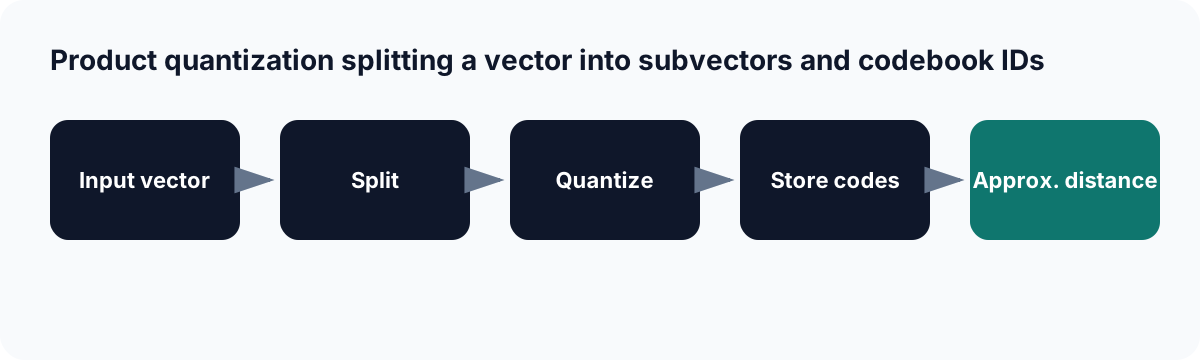
Product quantization compresses vector segments into codebook identifiers and uses approximate distances during search.
Vector quantization in its simplest form maps each full vector to the nearest centroid in a codebook. If you train a codebook with 65,536 centroids on your data, each vector can be stored as a 16-bit index into that codebook. A 1536-dimensional float32 vector shrinks from 6,144 bytes to 2 bytes.
The problem is that 65,536 centroids is insufficient to represent the diversity in a high-dimensional space. To accurately represent all 1536-dimensional vectors, you would need an astronomically large codebook. The curse of dimensionality makes a single-codebook approach intractable.
Product Quantization's insight: do not quantize the full vector at once. Split it into several short subvectors and quantize each subspace independently with its own small codebook.
Standard vector quantization (fails at high dimension):
  1536-dim vector → find nearest centroid in one codebook of 65,536
  Problem: 65,536 centroids cannot cover 1536-dimensional space accurately

Product Quantization (works at any dimension):
  1536-dim vector → split into 96 subvectors of 16 dimensions each
  Subvector 1:  [dim 1..16]   → find nearest centroid in codebook_1 (256 centroids)
  Subvector 2:  [dim 17..32]  → find nearest centroid in codebook_2 (256 centroids)
  ...
  Subvector 96: [dim 1521..1536] → find nearest centroid in codebook_96 (256 centroids)

  Each subspace has only 16 dimensions → 256 centroids cover it accurately
  Total storage: 96 one-byte indices = 96 bytes per vector
  Original:      1536 * 4 bytes = 6144 bytes per vector
  Compression:   64x
According to Pinecone's PQ guide, product quantization is a popular method for dramatically compressing high-dimensional vectors to use 97 percent less memory, and for making nearest-neighbor search speeds 5.5x faster in their tests.
The name "product" in Product Quantization comes from the Cartesian product. The full codebook is the Cartesian product of all subspace codebooks: 256 centroids per subspace across 96 subspaces gives a total representational capacity of 256^96 possible unique vectors, which is more than enough to represent any real dataset. The key insight is that instead of explicitly representing all those combinations, you only store 96 bytes per vector and look up the subspace centroids during distance computation.
Step 1: Subspace Decomposition
The first decision is how many subvectors M to split each vector into. Each subvector has dimensionality d/M. The vector's original dimensions are partitioned contiguously: subvector 1 takes dimensions 1 through d/M, subvector 2 takes dimensions d/M+1 through 2*d/M, and so on.
import numpy as np

def decompose_into_subvectors(vector: np.ndarray, M: int) -> list[np.ndarray]:
    """
    Split a d-dimensional vector into M equal subvectors.
    d must be divisible by M.
    """
    d = len(vector)
    assert d % M == 0, f"d={d} must be divisible by M={M}"
    sub_dim = d // M
    return [vector[i * sub_dim : (i + 1) * sub_dim] for i in range(M)]

# Example: 1536-dimensional vector split into 96 subvectors
d = 1536
M = 96
sub_dim = d // M   # 16 dimensions per subvector

v = np.random.randn(d).astype(np.float32)
subvectors = decompose_into_subvectors(v, M)

print(f"Original vector:   {d} dimensions,  {d * 4} bytes")
print(f"Number of subvecs: {len(subvectors)}")
print(f"Each subvector:    {sub_dim} dimensions, {sub_dim * 4} bytes")

# Original vector:   1536 dimensions,  6144 bytes
# Number of subvecs: 96
# Each subvector:    16 dimensions, 64 bytes
The choice of M controls the fundamental accuracy-compression tradeoff:
A smaller M means fewer, larger subvectors. Each subvector has more dimensions, making it harder to represent accurately with only 256 centroids. Accuracy is lower but the compressed code is shorter.
A larger M means more, smaller subvectors. Each subvector has fewer dimensions and can be represented accurately with 256 centroids. Accuracy is higher but the compressed code is longer (M bytes per vector).
The practical constraint from VeloDB's PQ guide is that sub_dim should be between 4 and 16 dimensions for k-means to work well. Below 4 dimensions, 256 centroids massively overrepresent the space. Above 16 dimensions, the codebook may not cover the subspace well. For d=1536, M=96 to 192 is the typical range, producing sub_dim of 16 to 8 dimensions.
Step 2: Codebook Training
For each of the M subspaces, a codebook of K centroids is trained using k-means on a representative sample of the subvectors in that position.
from sklearn.cluster import MiniBatchKMeans
import numpy as np

def train_pq_codebooks(
    training_data: np.ndarray,
    M: int,
    K: int = 256,
    n_iterations: int = 20,
) -> list[np.ndarray]:
    """
    Train M codebooks, one per subspace.
    Each codebook has K centroids of dimension d/M.

    training_data: shape (n_train, d)
    Returns: list of M arrays, each of shape (K, d/M)
    """
    n_train, d = training_data.shape
    sub_dim = d // M
    codebooks = []

    for m in range(M):
        # Extract the m-th subvector from all training vectors
        subvecs = training_data[:, m * sub_dim : (m + 1) * sub_dim]

        # Run k-means to find K representative centroids for this subspace
        kmeans = MiniBatchKMeans(
            n_clusters=K,
            max_iter=n_iterations,
            random_state=42,
            n_init=1,
        )
        kmeans.fit(subvecs)
        codebooks.append(kmeans.cluster_centers_.astype(np.float32))

        if m % 10 == 0:
            print(f"  Trained codebook {m+1}/{M}, "
                  f"inertia: {kmeans.inertia_:.4f}")

    return codebooks

# Training example
d = 128   # smaller dimension for demo speed
M = 8
K = 256

training_data = np.random.randn(50_000, d).astype(np.float32)
print("Training PQ codebooks...")
codebooks = train_pq_codebooks(training_data, M=M, K=K)

print(f"\nCodebook structure:")
print(f"  Number of codebooks: {len(codebooks)}")
print(f"  Each codebook shape: {codebooks[0].shape}  "
      f"({K} centroids × {d // M} dimensions)")
print(f"  Total codebook memory: "
      f"{M * K * (d // M) * 4 / 1024:.1f} KB")

# Codebook structure:
#   Number of codebooks: 8
#   Each codebook shape: (256, 16)
#   Total codebook memory: 128.0 KB
The codebooks are trained once and stored alongside the index. Their total memory is M * K * sub_dim * 4 bytes. For M=96, K=256, sub_dim=16: 96 * 256 * 16 * 4 = 25 MB. That is the same regardless of whether 1 million or 1 billion vectors are indexed. Codebook memory is negligible compared to the vector storage being compressed.
The diagram of what gets learned:
Subspace 1 (dimensions 1 to 16): codebook_1
  Centroid 0:   [ 0.41, -0.22,  0.88, ...,  0.03]  (16 floats)
  Centroid 1:   [-0.11,  0.73, -0.44, ..., -0.67]
  Centroid 2:   [ 0.92, -0.15,  0.31, ...,  0.54]
  ...
  Centroid 255: [-0.38,  0.81,  0.12, ..., -0.29]

Subspace 2 (dimensions 17 to 32): codebook_2
  Centroid 0:   [-0.72,  0.31, -0.18, ...,  0.44]
  ...
  Centroid 255: [ 0.15, -0.63,  0.77, ..., -0.08]

... (96 codebooks total for d=1536, M=96)
Each centroid is a learned representative of a common pattern in that region of that subspace. The 256 centroids in codebook_1 cover the most frequently occurring 16-dimensional patterns in the first 16 dimensions of the training data. This is why representative training data matters: if your training set does not include all the semantic regions of your embedding space, some subspaces will have poorly placed centroids.
Step 3: Encoding Vectors (Compression)
Once codebooks are trained, encoding a new vector means finding the nearest centroid in each subspace and storing its index.
def encode_vector(
    vector: np.ndarray,
    codebooks: list[np.ndarray],
    M: int,
) -> np.ndarray:
    """
    Encode a vector into its PQ code.
    Returns: uint8 array of shape (M,) - one centroid ID per subspace.
    """
    d       = len(vector)
    sub_dim = d // M
    code    = np.zeros(M, dtype=np.uint8)

    for m in range(M):
        subvec = vector[m * sub_dim : (m + 1) * sub_dim]
        cb     = codebooks[m]   # shape (K, sub_dim)

        # Find nearest centroid by squared Euclidean distance
        diffs      = cb - subvec          # shape (K, sub_dim)
        sq_dists   = np.sum(diffs ** 2, axis=1)   # shape (K,)
        nearest_id = np.argmin(sq_dists)

        code[m] = nearest_id

    return code


def encode_corpus(
    corpus: np.ndarray,
    codebooks: list[np.ndarray],
    M: int,
) -> np.ndarray:
    """
    Encode all vectors in the corpus. Returns uint8 array of shape (n, M).
    """
    return np.array([encode_vector(v, codebooks, M) for v in corpus],
                    dtype=np.uint8)


# Demonstrate the storage reduction
d = 128
M = 8
K = 256

v = np.random.randn(d).astype(np.float32)
codebooks = train_pq_codebooks(
    np.random.randn(10_000, d).astype(np.float32), M=M, K=K
)

pq_code = encode_vector(v, codebooks, M)

print(f"Original vector: {v.nbytes} bytes  ({d} floats × 4 bytes)")
print(f"PQ code:         {pq_code.nbytes} bytes  ({M} uint8 values)")
print(f"Compression:     {v.nbytes // pq_code.nbytes}x")
print(f"PQ code values:  {pq_code.tolist()}")

# Original vector: 512 bytes  (128 floats × 4 bytes)
# PQ code:           8 bytes  (8 uint8 values)
# Compression:       64x
# PQ code values:  [143, 27, 201, 88, 14, 172, 255, 63]
The PQ code [143, 27, 201, 88, 14, 172, 255, 63] means: in subspace 1, this vector's first 16 dimensions are closest to centroid number 143. In subspace 2, its next 16 dimensions are closest to centroid number 27. And so on.
This is all the information stored in the index. The original 512-byte vector is gone. From this point forward, all similarity computations use the 8-byte code together with the codebooks.
Step 4: Asymmetric Distance Computation
Here is where PQ's search efficiency comes from. When a query arrives, the system must estimate the distance between the query vector and each compressed database vector. The naive approach would be to decompress each database vector (reconstruct it from its centroid codes) and then compute the dot product. That partially defeats the purpose.
Asymmetric Distance Computation (ADC) is smarter. It keeps the database vectors compressed and computes approximate distances using lookup tables.
ADC procedure for a query vector q against a PQ-compressed database:

Step 1: Split q into M subvectors (same decomposition as encoding)
  q_1 = q[0:16]        q_2 = q[16:32]  ...  q_96 = q[1520:1536]

Step 2: Build lookup tables  (one per subspace, K rows each)
  For subspace m, table[m][k] = distance(q_m, codebook_m[k])

  table[0]:
    table[0][0]   = dist(q_1, codebook_1[centroid_0])   = 0.31
    table[0][1]   = dist(q_1, codebook_1[centroid_1])   = 0.87
    table[0][2]   = dist(q_1, codebook_1[centroid_2])   = 0.12
    ...
    table[0][255] = dist(q_1, codebook_1[centroid_255]) = 0.54

  table[1]: same for subspace 2 with q_2
  ... (96 tables total, each with 256 entries)

Step 3: For each compressed database vector, estimate distance
  Database vector code: [143, 27, 201, 88, 14, 172, 255, 63]

  Estimated distance = table[0][143]
                     + table[1][27]
                     + table[2][201]
                     + table[3][88]
                     + table[4][14]
                     + table[5][172]
                     + table[6][255]
                     + table[7][63]

  = 8 table lookups + 7 additions   (NOT 1536 multiply-add operations)
This is why ADC is fast. Building the lookup tables is done once per query: M subspaces × K centroids distance computations = 96 × 256 = 24,576 dot products on 16-dimensional vectors. After that, each database vector's distance is estimated with M table lookups and M additions.
The "asymmetric" name comes from the fact that the query stays in full float32 precision while the database vectors are compressed. Compressing the query too (symmetric quantization) would double the quantization error. Keeping the query uncompressed gives more accurate distance estimates.
import numpy as np

def build_adc_tables(
    query: np.ndarray,
    codebooks: list[np.ndarray],
    M: int,
) -> np.ndarray:
    """
    Build ADC lookup tables for a query vector.
    Returns: float32 array of shape (M, K)
    Each entry table[m][k] = distance from query subvector m to centroid k.
    """
    d = len(query)
    sub_dim = d // M
    K = codebooks[0].shape[0]
    tables = np.zeros((M, K), dtype=np.float32)

    for m in range(M):
        q_sub = query[m * sub_dim : (m + 1) * sub_dim]
        cb    = codebooks[m]   # shape (K, sub_dim)

        # Squared Euclidean distance from q_sub to each centroid
        diffs           = cb - q_sub
        tables[m]       = np.sum(diffs ** 2, axis=1)

    return tables


def adc_distance(pq_code: np.ndarray, tables: np.ndarray) -> float:
    """
    Estimate distance from a compressed vector to the query using ADC.
    pq_code: uint8 array of shape (M,)
    tables:  float32 array of shape (M, K)
    """
    # Each entry: look up table[m][pq_code[m]] and sum
    return float(sum(tables[m, pq_code[m]] for m in range(len(pq_code))))


def adc_search(
    query: np.ndarray,
    pq_codes: np.ndarray,    # shape (n, M)
    codebooks: list[np.ndarray],
    M: int,
    k: int = 10,
) -> tuple[np.ndarray, np.ndarray]:
    """
    Approximate nearest neighbor search using ADC.
    Returns (distances, indices) for top-k results.
    """
    # Build tables once per query
    tables = build_adc_tables(query, codebooks, M)

    # Vectorized ADC: look up table values for all codes at once
    # tables has shape (M, K), pq_codes has shape (n, M)
    # For each vector i and subspace m: tables[m, pq_codes[i, m]]
    n = len(pq_codes)
    distances = np.zeros(n, dtype=np.float32)

    for m in range(M):
        distances += tables[m][pq_codes[:, m]]

    # Return top-k indices sorted by distance
    top_k_idx  = np.argsort(distances)[:k]
    return distances[top_k_idx], top_k_idx


# End-to-end demonstration
d = 128
M = 8
K = 256
n = 100_000

corpus  = np.random.randn(n, d).astype(np.float32)
query   = np.random.randn(d).astype(np.float32)

# Train codebooks
codebooks = train_pq_codebooks(corpus[:10_000], M=M, K=K)

# Encode entire corpus
pq_codes = encode_corpus(corpus, codebooks, M)  # shape (100_000, 8), uint8

print(f"Corpus memory (full):      {corpus.nbytes / 1e6:.1f} MB")
print(f"Corpus memory (PQ codes):  {pq_codes.nbytes / 1e6:.1f} MB")
print(f"Compression ratio:         {corpus.nbytes / pq_codes.nbytes:.0f}x")

# Corpus memory (full):      51.2 MB
# Corpus memory (PQ codes):   0.8 MB
# Compression ratio:          64x
The vectorized ADC implementation tables[m][pq_codes[:, m]] processes all n database vectors in one NumPy operation per subspace. Modern FAISS and Qdrant implementations optimize this further with SIMD instructions that process 16 to 32 lookup operations simultaneously.
The Accuracy Cost: Where Recall Is Lost
PQ introduces two sources of approximation error, and understanding both is necessary for diagnosing recall problems in production.
Quantization Error (Encoding Error)
When a subvector is replaced by its nearest centroid, the centroid is not identical to the original subvector. The difference is the quantization error. This error propagates to every distance estimate computed using ADC.
def measure_quantization_error(
    vectors: np.ndarray,
    codebooks: list[np.ndarray],
    M: int,
) -> dict:
    """
    Measure the average quantization error: distance from original subvector
    to its nearest centroid, summed across all subspaces.
    """
    d = vectors.shape[1]
    sub_dim = d // M
    total_sq_error = 0.0

    for m in range(M):
        subvecs = vectors[:, m * sub_dim : (m + 1) * sub_dim]
        cb      = codebooks[m]   # shape (K, sub_dim)

        # Find nearest centroid for each subvector
        for sv in subvecs:
            diffs    = cb - sv
            sq_dists = np.sum(diffs ** 2, axis=1)
            min_dist = sq_dists.min()
            total_sq_error += min_dist

    n = len(vectors)
    return {
        "mean_sq_error_per_vector": total_sq_error / n,
        "rmse": float(np.sqrt(total_sq_error / n)),
    }

# Quantization error decreases as M increases or K increases
d = 128
corpus = np.random.randn(5_000, d).astype(np.float32)

print(f"{'M':>4} | {'K':>5} | {'RMSE':>10}")
print("-" * 28)
for M in [4, 8, 16]:
    for K in [64, 256]:
        cbs  = train_pq_codebooks(corpus, M=M, K=K)
        err  = measure_quantization_error(corpus[:500], cbs, M)
        print(f"{M:>4} | {K:>5} | {err['rmse']:>10.4f}")

# M=4, K=64:  RMSE is highest   - fewest subvectors + fewest centroids
# M=16, K=256: RMSE is lowest  - most subvectors + most centroids
Quantization error is directly related to how accurately the codebook centroids represent the real subvector distribution. A larger K (more centroids) reduces quantization error. A larger M (smaller subvectors) reduces quantization error because smaller subvectors are easier to cluster accurately.
Boundary Ranking Errors
Even when quantization error is low on average, specific pairs of vectors can have their relative ordering flipped. Two database vectors that are nearly equidistant from the query may swap ranks after quantization. For a top-10 retrieval task, flips between positions 9 and 11 cause a recall miss; flips between positions 1 and 2 do not affect recall at all.
This is why PQ recall is not simply a function of quantization error magnitude. It depends on the geometry of the specific query and the specific nearest neighbor candidates.
FAISS Implementation: Full PQ Pipeline
FAISS provides a production-grade PQ implementation that handles all steps natively.
import numpy as np
import faiss
import time

d = 1536   # OpenAI text-embedding-3-small dimension
n = 500_000
M = 96     # 96 subvectors, each of 16 dimensions
nbits = 8  # 256 centroids per subspace, 1 byte per code

# Generate data
corpus = np.random.randn(n, d).astype(np.float32)
faiss.normalize_L2(corpus)
query = np.random.randn(1, d).astype(np.float32)
faiss.normalize_L2(query)

# Exact search for ground truth
flat = faiss.IndexFlatIP(d)
flat.add(corpus)
_, gt = flat.search(query, 10)

# Pure PQ index (search entire corpus using ADC)
pq_index = faiss.IndexPQ(d, M, nbits)
t0 = time.perf_counter()
pq_index.train(corpus[:50_000])
pq_index.add(corpus)
build_s = time.perf_counter() - t0
print(f"PQ index built in {build_s:.1f}s")

t0 = time.perf_counter()
_, pq_ids = pq_index.search(query, 10)
pq_ms = (time.perf_counter() - t0) * 1000

recall_pq = len(set(gt[0]) & set(pq_ids[0])) / 10

# IVF-PQ index (cluster-first, then PQ within clusters)
nlist = 1024
quantizer = faiss.IndexFlatIP(d)
ivfpq_index = faiss.IndexIVFPQ(quantizer, d, nlist, M, nbits)
ivfpq_index.train(corpus[:100_000])
ivfpq_index.add(corpus)
ivfpq_index.nprobe = 20

t0 = time.perf_counter()
_, ivfpq_ids = ivfpq_index.search(query, 10)
ivfpq_ms = (time.perf_counter() - t0) * 1000

recall_ivfpq = len(set(gt[0]) & set(ivfpq_ids[0])) / 10

# Memory comparison
original_bytes  = corpus.nbytes
pq_bytes        = pq_index.sa_code_size() * n + pq_index.pq.M * 256 * (d // M) * 4
ivfpq_bytes     = ivfpq_index.sa_code_size() * n

print(f"\n{'Index':>12} | {'Memory':>10} | {'Recall@10':>10} | {'Latency':>8}")
print("-" * 50)
print(f"{'Flat (exact)':>12} | {original_bytes/1e9:>8.1f}GB | {'1.0000':>10} | {'baseline':>8}")
print(f"{'PQ only':>12} | {pq_bytes/1e6:>8.1f}MB | {recall_pq:>10.4f} | {pq_ms:>6.1f}ms")
print(f"{'IVF-PQ':>12} | {ivfpq_bytes/1e6:>8.1f}MB | {recall_ivfpq:>10.4f} | {ivfpq_ms:>6.1f}ms")

# Approximate output:
# Index      |     Memory | Recall@10 |  Latency
# --------------------------------------------------
# Flat (exact) |    3.1GB |    1.0000 | baseline
# PQ only      |   48.0MB |    0.8623 |   280ms  (fast ADC but still searches all)
# IVF-PQ       |   48.1MB |    0.8411 |    8.2ms  (cluster first, ADC in clusters)
The comparison reveals an important property. A pure PQ index searches the entire corpus using ADC table lookups, which is faster than full dot products but still O(n). IVF-PQ combines cluster selection (skip 98 percent of vectors) with PQ compression (fast ADC in the searched clusters), giving both memory savings and latency reduction. IVF-PQ is slightly lower recall than pure PQ at the same nprobe because it has two sources of approximation: the cluster boundary problem and the quantization error.
Tuning M and nbits
The two PQ parameters, M and nbits, control the fundamental accuracy-compression tradeoff.
import faiss
import numpy as np

d = 128
n = 100_000
k = 10

corpus  = np.random.randn(n, d).astype(np.float32)
queries = np.random.randn(100, d).astype(np.float32)
faiss.normalize_L2(corpus)
faiss.normalize_L2(queries)

flat = faiss.IndexFlatIP(d)
flat.add(corpus)
_, gt = flat.search(queries, k)

print(f"{'M':>4} | {'nbits':>5} | {'Code bytes':>10} | {'Recall@10':>10} | {'Compression':>11}")
print("-" * 55)

for M in [4, 8, 16]:
    for nbits in [8]:   # standard 8-bit codes
        assert d % M == 0

        pq = faiss.IndexPQ(d, M, nbits)
        pq.train(corpus[:10_000])
        pq.add(corpus)
        _, pq_ids = pq.search(queries, k)

        recall = np.mean([
            len(set(gt[i]) & set(pq_ids[i])) / k
            for i in range(len(queries))
        ])

        code_bytes    = M * (nbits // 8)
        original_bytes = d * 4
        compression   = original_bytes // code_bytes

        print(f"{M:>4} | {nbits:>5} | {code_bytes:>10} | {recall:>10.4f} | {compression:>9}x")

# M=4:   4 bytes per vector,  64x compression, lowest recall
# M=8:   8 bytes per vector,  32x compression, moderate recall
# M=16: 16 bytes per vector,  16x compression, highest recall
The tradeoff in one sentence: more subvectors (higher M) gives better recall and larger compressed codes. For most production deployments, M is chosen to give sub_dim of 8 to 16 dimensions (which provides adequate centroid coverage with K=256) and the resulting compression is accepted as the cost of fitting in memory.
According to Tacnode's vector quantization guide, the standard configuration for 1536-dimensional vectors uses 192 subvectors of 8 dimensions each (sub_dim=8, M=192) giving 192 bytes per vector and 32x compression, or 96 subvectors of 16 dimensions (M=96) giving 96 bytes and 64x compression. The former gives better recall, the latter saves more memory.
Rescoring: Recovering Precision After PQ
Production systems frequently add a rescoring step after PQ-based retrieval. The top candidates from the PQ search are rescored using their original uncompressed vectors, producing a more accurate final ranking.
def pq_search_with_rescoring(
    query: np.ndarray,
    pq_index,                  # FAISS PQ or IVF-PQ index
    original_corpus: np.ndarray,
    first_k: int = 100,        # candidates from PQ (oversample)
    final_k: int = 10,         # results after rescoring
) -> tuple[np.ndarray, np.ndarray]:
    """
    Two-stage retrieval:
    Stage 1: Fast PQ search to get candidate set (approximate)
    Stage 2: Exact rescoring of candidates using original vectors
    """
    # Stage 1: PQ approximate search (M table lookups per candidate)
    _, candidate_ids = pq_index.search(query.reshape(1, -1), first_k)
    candidate_ids = candidate_ids[0]

    # Stage 2: Exact rescoring using full precision vectors
    candidate_vectors = original_corpus[candidate_ids]
    exact_scores      = candidate_vectors @ query   # exact dot products

    # Sort by exact score and return top final_k
    rerank_order = np.argsort(exact_scores)[::-1][:final_k]
    return exact_scores[rerank_order], candidate_ids[rerank_order]


# Rescoring significantly improves recall at modest additional cost.
# Retrieving 100 PQ candidates and rescoring to 10 typically recovers
# 5 to 10 percentage points of recall compared to direct PQ top-10.
This rescoring pattern is the production-grade approach for IVF-PQ. According to Qdrant's PQ documentation, oversampling and rescoring with original vectors is a key mechanism for recovering recall lost to quantization. Qdrant exposes this via the rescore=True and oversampling parameters in its quantization search configuration.
Scalar Quantization as a Simpler Alternative
PQ is not the only compression option. Scalar quantization (SQ) is simpler and worth considering before committing to PQ complexity.
def scalar_quantize_int8(vectors: np.ndarray) -> tuple[np.ndarray, float, float]:
    """
    Compress float32 vectors to int8 by linear scaling.
    Each dimension independently mapped to [-128, 127].
    Memory reduction: 4x (float32 → int8).
    """
    min_val = vectors.min()
    max_val = vectors.max()
    scale   = (max_val - min_val) / 255.0

    quantized = np.clip(
        np.round((vectors - min_val) / scale) - 128,
        -128, 127
    ).astype(np.int8)

    return quantized, min_val, scale

corpus = np.random.randn(1_000_000, 1536).astype(np.float32)
sq_corpus, min_val, scale = scalar_quantize_int8(corpus)

print(f"Float32 memory:  {corpus.nbytes / 1e9:.1f} GB")
print(f"Int8 memory:     {sq_corpus.nbytes / 1e9:.1f} GB")
print(f"Compression:     4x")
print()
print("Comparison:")
print("  Scalar quantization: 4x compression, ~1 to 2% recall loss, simple")
print("  Product quantization: 32 to 64x compression, 5 to 15% recall loss, complex")
According to Tacnode's quantization comparison, you should start with int8 scalar quantization. It works for most workloads with minimal recall loss. Move to PQ only when scalar quantization's 4x reduction is insufficient and the remaining recall loss is acceptable for your application.
The decision point:
If full float32 index fits in RAM:          → Use HNSW or IVFFlat (no quantization)
If scalar quantization fits in RAM:         → Use SQ + HNSW or SQ + IVFFlat
If only PQ compression fits in RAM:         → Use IVF-PQ
If nothing fits in one node:               → Distributed sharding + IVF-PQ
PQ in Production Vector Databases
Every major vector database exposes PQ or equivalent compression options.
In Qdrant, PQ is available through the quantization_config parameter when creating a collection. Qdrant also supports scalar quantization and binary quantization. The rescore=True and oversampling parameters enable the two-stage retrieval pattern automatically.
In Milvus, IVF-PQ is available as a first-class index type alongside IVFFlat and HNSW. Milvus also supports GPU-accelerated IVF-PQ indexing and search, which dramatically reduces build time for large corpora.
In pgvector, half-precision (float16) storage is supported as a scalar quantization alternative. Full product quantization is not yet available natively in pgvector.
In FAISS, PQ is available as standalone IndexPQ, combined with IVF as IndexIVFPQ, and combined with HNSW as IndexHNSWPQ. The FAISS factory string syntax makes combining these straightforward: "IVF1024,PQ96x8" creates an IVF-PQ index with 1024 clusters and 96 PQ subvectors of 8 bits each.
import faiss

d = 1536

# FAISS factory string examples
# "IVF1024,PQ96x8" = IVF with 1024 clusters + PQ with 96 subvectors 8-bit codes
# "HNSW32,PQ96x8"  = HNSW with M=32 + PQ compression
# "PQ96x8"         = Flat PQ (no cluster structure, searches all with ADC)

index_factory = f"IVF1024,PQ96x8"
index = faiss.index_factory(d, index_factory, faiss.METRIC_INNER_PRODUCT)
print(f"Created: {index_factory}")
print(f"Type:    {type(index).__name__}")
# Created: IVF1024,PQ96x8
# Type:    IndexIVFPQ
Summary
Product Quantization compresses high-dimensional vectors by splitting each vector into M equal subvectors, replacing each subvector with a one-byte index identifying its nearest centroid in a pre-trained codebook, and storing only those M bytes instead of the full float32 vector. A 1536-dimensional float32 vector (6,144 bytes) becomes 96 bytes with M=96, a 64x reduction.
The four-stage pipeline is: subspace decomposition (split into M subvectors), codebook training (k-means per subspace on training data), encoding (replace each subvector with its nearest centroid index), and search via Asymmetric Distance Computation (build M lookup tables per query, estimate distances with M table lookups per database vector).
Accuracy is lost because the quantized representation is an approximation of the original vector. The quantization error decreases with higher M and higher K but increases the code size. The rescoring pattern (retrieve 100 PQ candidates, rescore with exact vectors, return top 10) recovers most of the lost precision at modest additional cost.
PQ is appropriate when the uncompressed index does not fit in RAM. For collections that fit comfortably in memory, HNSW or IVFFlat without quantization gives better recall with less complexity. The IVF-PQ article covers how PQ integrates with the cluster-based IVF index. The How Vector Databases Work Internally pillar shows where compression fits in the full database architecture.
Do not confuse vector Product Quantization with neural-network weight quantization. PQ compresses stored embedding vectors for nearest-neighbor search; methods such as TurboQuant for AI model compression reduce the memory or compute cost of model inference.
Sources and Further Reading
- Jégou, Douze, Schmid. Product Quantization for Nearest Neighbor Search. ieee.org - IEEE TPAMI 2011
- Pinecone. Product Quantization: Compressing High-Dimensional Vectors by 97%. pinecone.io/learn/series/faiss/product-quantization
- VeloDB. Product Quantization: Efficient Vector Compression for Scalable Similarity Search. velodb.io/glossary/efficient-vector-compression-for-scalable-similarity-search
- Milvus AI Reference. How Does PQ Reduce Memory Footprint? milvus.io/ai-quick-reference/pq-memory-footprint
- Zilliz AI FAQ. How Does Vector Quantization Help Reduce Storage? zilliz.com/ai-faq/vector-quantization-storage
- Qdrant. What Is Vector Quantization? qdrant.tech/articles/what-is-vector-quantization
- Tacnode. Vector Quantization: Compress Vectors 4 to 32x Without Losing Accuracy. tacnode.io/post/vector-quantization-explained
- Towards Data Science. Product Quantization for Similarity Search. towardsdatascience.com/product-quantization-for-similarity-search
- Michael Brenndoerfer. Product Quantization: Vector Compression for ANN Search. mbrenndoerfer.com/writing/product-quantization-vector-compression-ann-search
- André, Douze, Jégou. Accelerated Nearest Neighbor Search with Quick ADC. arxiv.org/abs/1704.07355
- OpenSearch. Asymmetric Distance Computation for Binary Quantization. opensearch.org/blog/asymmetric-distance-computation-for-binary-quantization
- FAISS. The Index Factory. github.com/facebookresearch/faiss/wiki/The-index-factory
- arXiv. LooC: Effective Low-Dimensional Codebook for Compositional Vector Quantization. arxiv.org/abs/2601.00222
- Siddharth Jain. Deep Dive into FAISS IndexIVFPQ. blog.siddjain.com/2023/12/30/deep-dive-into-faiss-indexivfpq-for-vector-search
- Milvus. Product Quantization Documentation. milvus.io/docs/pq-scann-sq.md
Related Reading
Sources
Frequently Asked Questions
What is Product Quantization in vector search?
Product Quantization (PQ) is a lossy compression technique that reduces the memory footprint of high-dimensional vectors by 32 to 64 times. It works by splitting each vector into M equal-sized subvectors and replacing each subvector with a single byte that identifies the nearest centroid in a pre-trained codebook. A 1536-dimensional float32 vector that normally occupies 6,144 bytes is compressed to M bytes, typically 96 to 192 bytes, depending on the number of subvectors chosen.
How much memory does Product Quantization save?
A 1536-dimensional float32 vector occupies 6,144 bytes. With PQ using M=96 subvectors and 8 bits per code, it compresses to 96 bytes - a 64x reduction. At 100 million vectors, that reduces index memory from 614 GB to about 9.6 GB, making billion-scale vector search feasible on a single server. The codebooks themselves are tiny relative to the dataset: 96 subspaces times 256 centroids times 16 dimensions times 4 bytes is about 25 MB regardless of how many vectors are stored.
What is Asymmetric Distance Computation (ADC) in PQ?
Asymmetric Distance Computation is the mechanism PQ uses to estimate distances between a full-precision query vector and compressed database vectors without decompressing the database vectors. At query time, the query is split into M subvectors. For each subspace, the distance from that query subvector to each of the 256 centroids is precomputed into a lookup table. The approximate distance to any compressed database vector is then computed by summing up the precomputed table values for its M centroid indices. This turns a 1536-dimension dot product into M table lookups, which is far faster and more cache-friendly.
What is the difference between PQ and scalar quantization?
Scalar quantization compresses each individual dimension from float32 to int8 or float16, reducing storage by 4x or 2x. It is fast and produces small accuracy losses. Product quantization compresses groups of dimensions together (subvectors) using learned codebooks, achieving 32 to 64x compression at the cost of more complex encoding and decoding. Scalar quantization is the simpler starting point for memory reduction. Product quantization is used when scalar quantization's 4x reduction is not enough and the workload can tolerate the additional recall loss.
How do M and nbits parameters affect PQ performance?
M is the number of subvectors the original vector is divided into. More subvectors means better reconstruction quality (each subspace is smaller and easier to represent accurately) but larger compressed codes (M bytes per vector). nbits determines how many centroids each subspace uses: nbits=8 gives 256 centroids and stores each code in one byte. Larger nbits (e.g., 12 or 16) gives more centroids and better accuracy but requires more codebook memory and larger codes. The standard configuration is M chosen so that d/M is between 4 and 16, and nbits=8 (256 centroids).
When should I use PQ and when should I avoid it?
Use PQ when your vector collection exceeds the available RAM in its uncompressed form and you need to fit the index in memory. A common threshold is collections exceeding 50 to 100 million vectors at 1536 dimensions. Avoid PQ when you can fit the full-precision index in RAM because PQ always introduces recall loss relative to IVFFlat or HNSW at the same nprobe. When recall is paramount and memory is available, prefer HNSW or IVFFlat. PQ is the right tool specifically for the memory-constrained billion-scale case.
Follow on Google
Add as a preferred source in Search & Discover
Add as preferred source
Krunal Kanojiya
Technical Content Writer
Krunal is a technical content writer at Lucent Innovation and a former full-stack developer with professional technology experience since 2021. He publishes source-backed, practical guides on AI engineering, RAG, vector search, data engineering, algorithms, and software development.